The M2M Service Portal 3.0 REST API
The REST API is secured using Oauth2 and 'OpenID Connect'. Customer acknowledges that the execution of certain functionalities using the REST API may cause further costs according to the agreements of the M2M framework agreement.
Architecture and overall processing
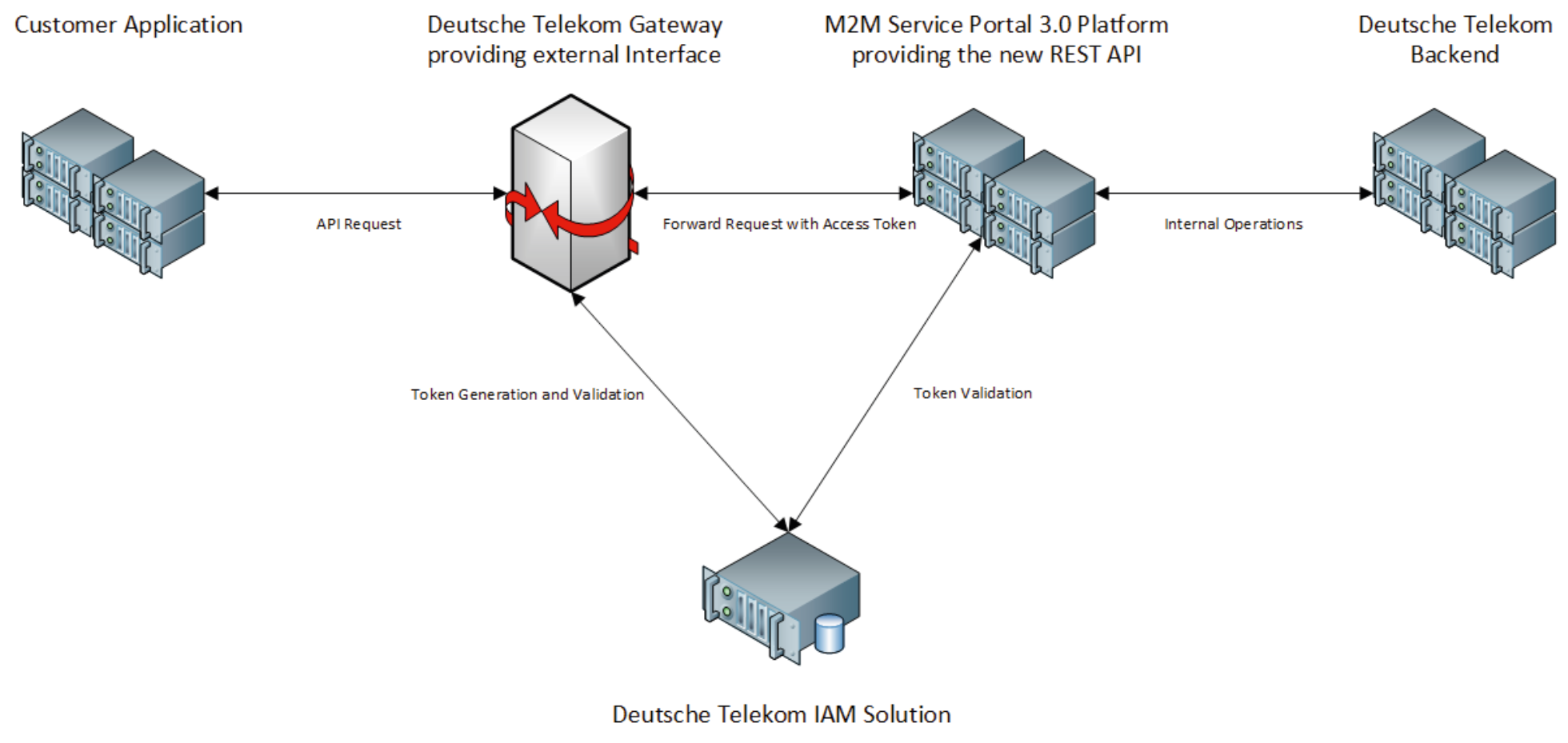
The new REST API is deployed via a dedicated API Gateway providing the external interface. Incoming calls are processed by the Gateway with corresponding customer requests first being authenticated using an integrated IAM solution. The customer request is then forwarded to the REST API together with a valid token. The token is once again validated by the M2M Service Portal 3.0 thereby authenticating and authorizing valid customer requests. The desired operation is executed on the M2M Service Portal 3.0 platform and in the backend systems. Results are returned to the customer as part of the synchronous communication.
Authentication Mechanism
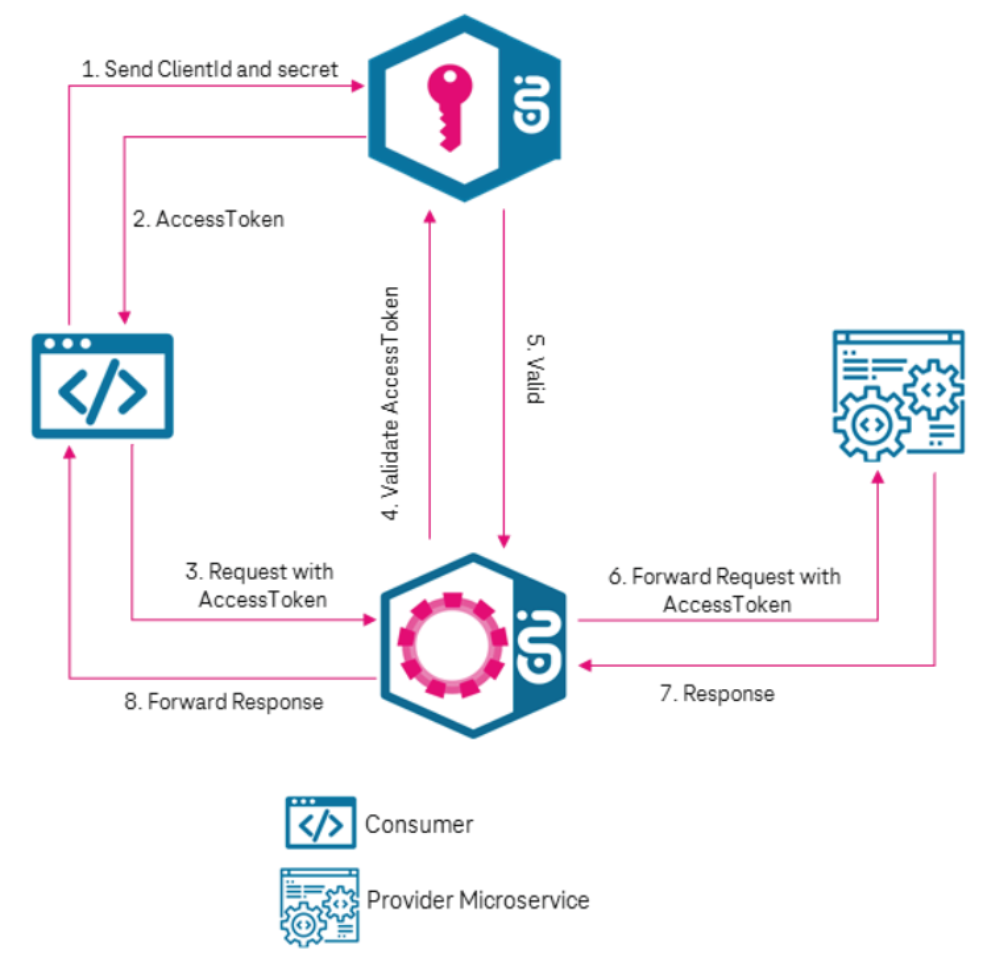
As mentioned in the beginning of this chapter and shown in above and below figures, the communication is secured using the standard 'OpenID Connect' protocol and tokens.
If you have booked the service REST API, the following applies: As soon as contract administration has processed your order the user for the technical contact will find a self administration area in the M2M Service Portal. Please check in My Partner Data the tab REST API. In this section you can either register new applications for REST API communication or manage existing ones incl. its individual client id and client secret.
Technical Parameters
You can access the productional REST API with the following URL:
The external base url: 'https://sg-api.telekom.de'
The M2M Service Portal 3.0 specific base path: '/iot/connectivity/management/v1'
A corresponding GET Request could look as follows:
https://sg-api.telekom.de/iot/connectivity/management/v1/partners/[partnerId]/sims
SIM Card Identifiers
Via POST requests, SIM cards can be selected by different identifiers like ICCID, eUICCID (eID), IMSI, IMEI (IMEISV) or MSISDN. Some identifiers may not be available depending on the request or type and status of the SIM card(s) (e.g. physical or virtual SIM card, productive or not productive). IMEI and IMEISV can equally be used to identify a SIM card.
For requests with the identifier in the resource path only ICCID is allowed.
See the following table for possible identifiers:
Possible SIM Card Identifiers
† Identifier as search parameter
* ICCID only support
** Multiple identifier support
Server Sent Events
For asynchronous actions on TMSP, server sent events (SSE) are used. These methods rely on GET calls that follow the OAuth2 client credential flow. Therefore, the onboarding is easy and there is no need for customers to expose reachable endpoints.
The retrieval of events works with GET requests using dedicated ressources per event type. You find the specific event URLs for your API subscriptions in the REST API page of the M2M Service Portal 3.0. The payload of the events itself can be found under Event Definition.
Detailed Implementation Guideline
- Your application has to send a GET request to the SSE endpoint described in the M2M Service Portal 3.0 including a Bearer Token.
- The gateway will respond once with an HTTP 200 and keep the connection open. The events will be sent via this open connection.
- The gateway will respond by default with the MIME type application-stream/json. This follows the Spring Webflux implementation. Other frameworks expect the MIME type text/event-stream according to the W3C Standard. The gateway caters for this standard, when the corresponding Accept header is set in the request. Please check, if your framework requires you to specifically enable this header.
Content-Type: text/event-stream;charset=UTF-8
Accept:       text/event-stream
Example header settings. - The open connection will automatically be closed after 60 seconds. You will see an HTTP 504, which is not an error. Your application has to open another connection to receive further events.
- If you open a new SSE connection and there exists already an open one, the latter one will be closed to prevent accidental double sending of events.
Please Note:
To gain access to the SSE, you might create a new REST application access in the partner portal. As soon as you change out the according client data, you are able to retrieve events.
Protective Measures
The M2M Service Portal 3.0 REST API can be used by customers been subscribed to the REST API service to administrate and monitor related IoT SIMs. To ensure all users a superior platform experience certain rate limits are defined. The rate limits below are available per customer and may be handled dynamically on a higher level if platform capacity is available. In case capacity limits are exceeded the platform will return a response.
(max. of 1k SIMs/6 mins)
(max. of 1k SIMs/6 mins)
(max. of 250 SIMs/6 mins)
{
  "status": "FORBIDDEN",
  "message": "Limit exceeded",
  "errors": [
    "Too Many Concurrent Requests on Platform."
  ],
  "timestamp": "2025-08-28 11:25:49"
}
Please Note:
The authentication mechanism used by the REST API is based on OAuth and OpenID. As shown below, the customer uses the client id and client secret in order to generate a token which is then sent to the Deutsche Telekom Gateway as part of the request. The token is validated by the backend and used in order to authenticate the user and authorize the requested operation.
In order to successfully generate a client token and authenticate to the Deutsche Telekom Gateway, the following parameters need to be configured within the new request:
Application Management in the Portal
REST API
Via the tab "REST API" you can call up an overview in which all registered applications are displayed.
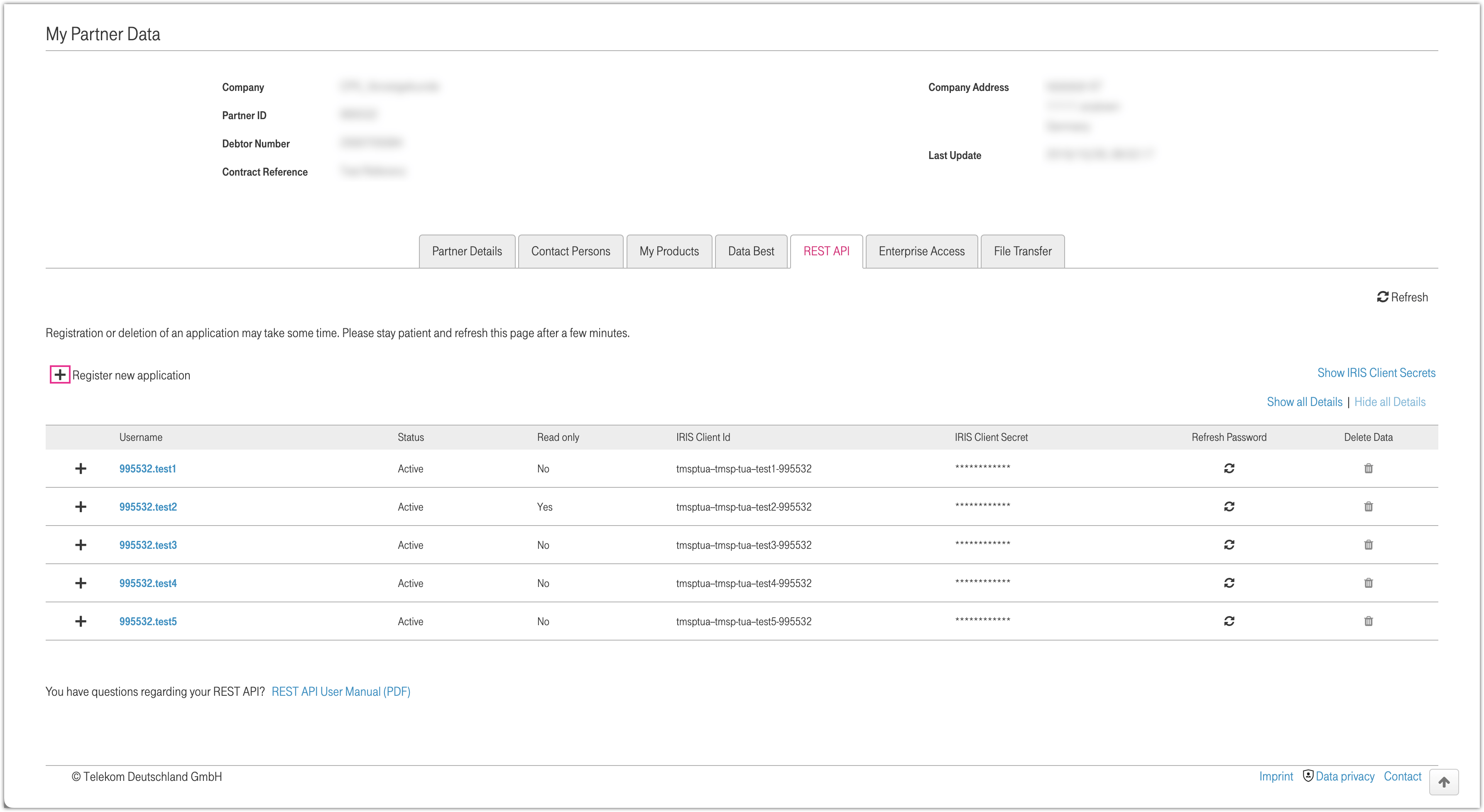
Figure 1: REST API overview
The table displays all created accounts. All users with their Client ID, Status, IRIS Client ID, IRIS Client Secret, etc. are visible on the first level. By clicking on the plus symbol, various event types with the corresponding subscription URL are displayed. If no URLs are available for this user, no plus symbol is displayed.
By clicking on Show IRIS Client Secrets, you can easily show the values for all users.
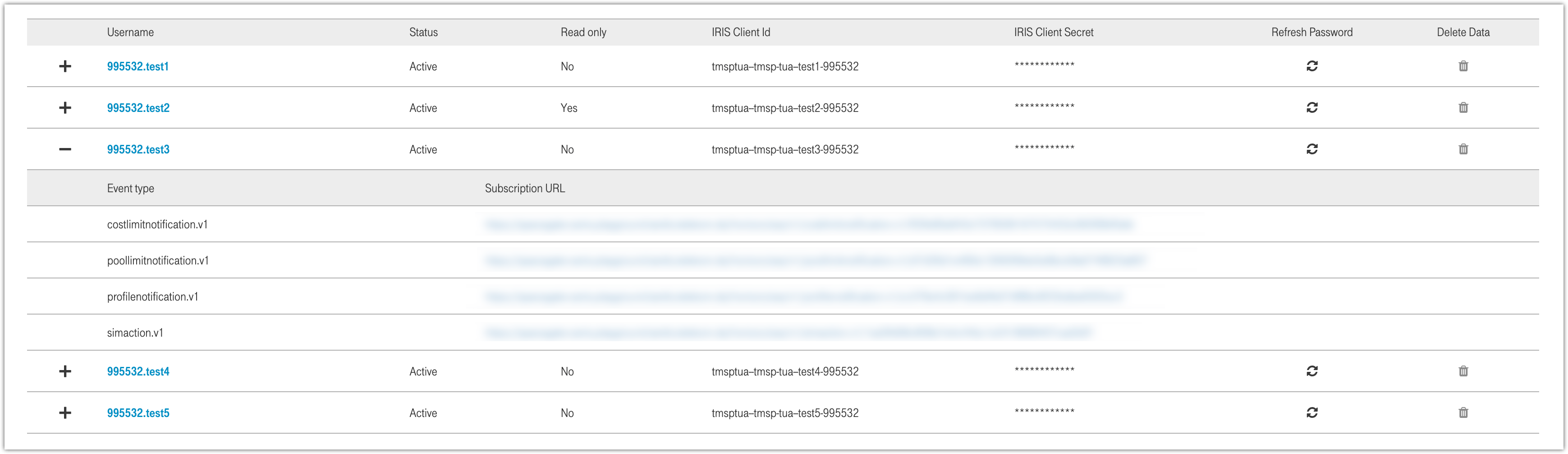
Figure 2: Corresponding subscription URLs
Register new application
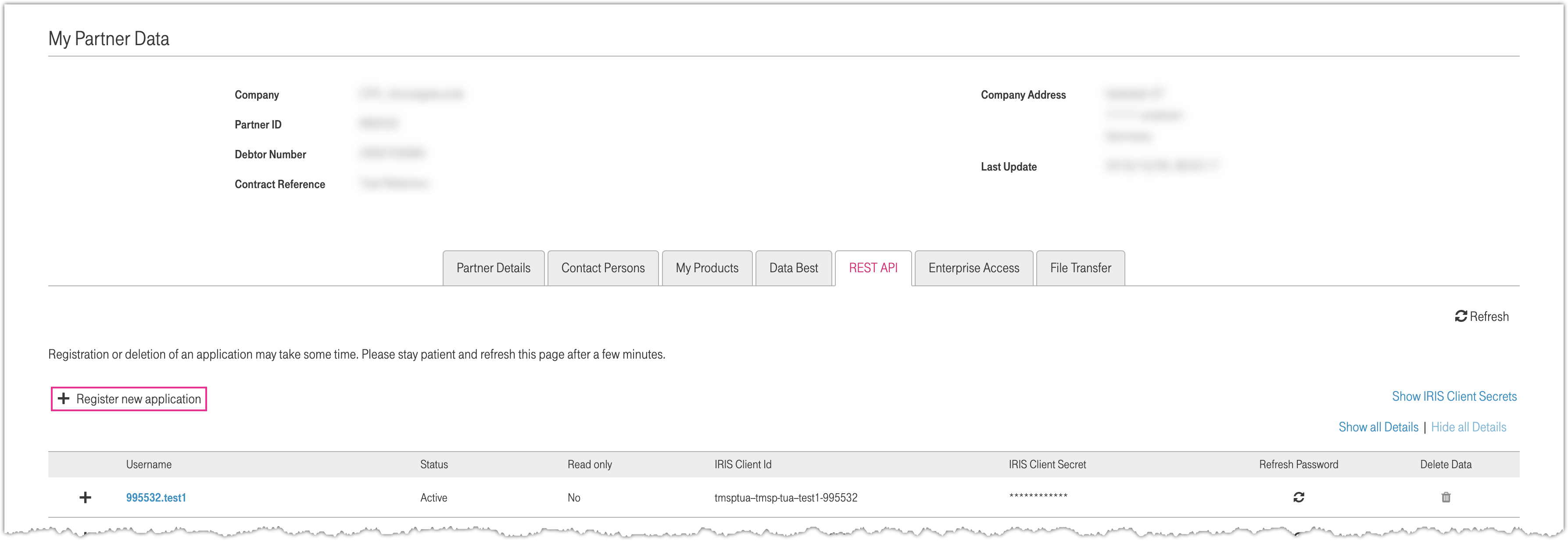
Figure 3: Register new application
Via the function "Register new application" you can call up the mask for entering the user name.
Clicking on "Save" opens a window.
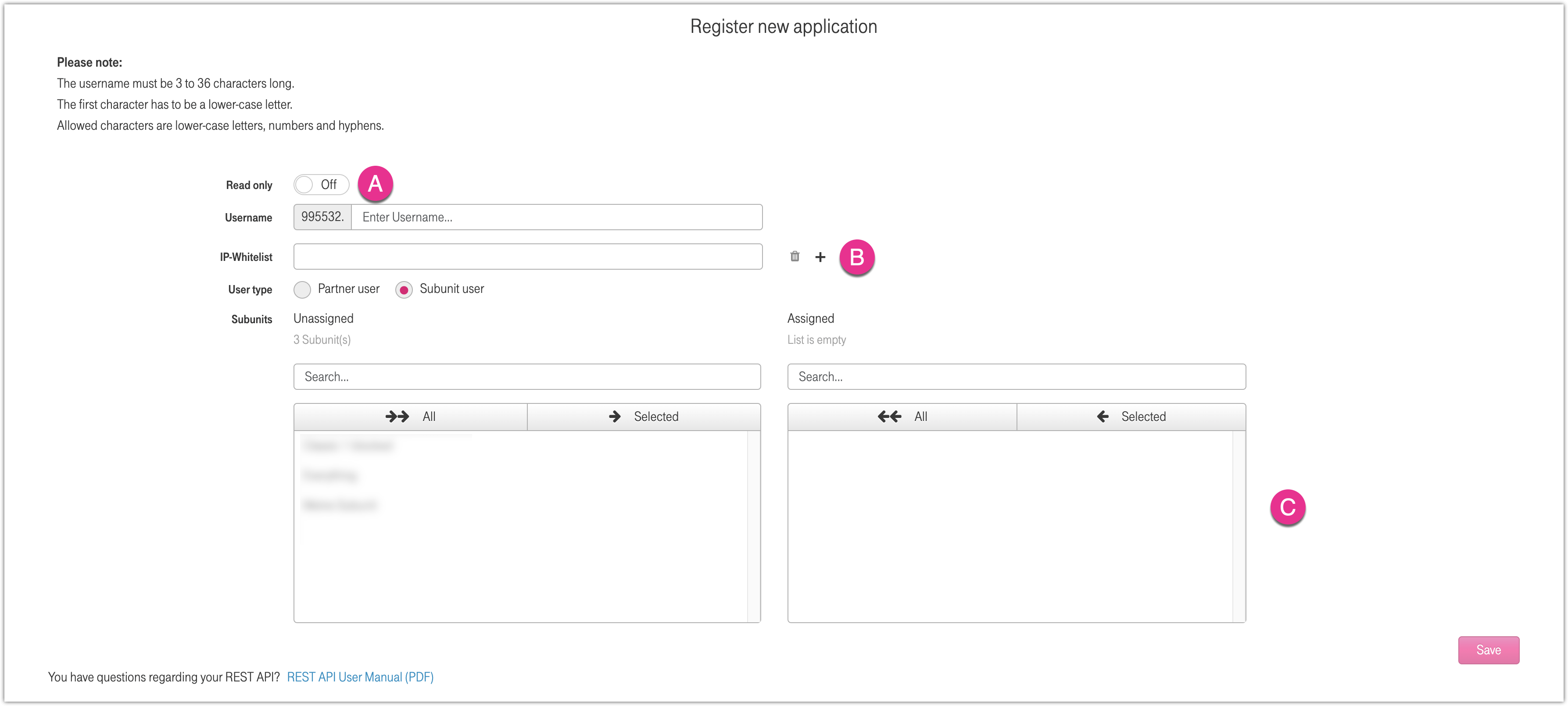
Figure 4: Register new application details
A) Read Only
If the read-only slider is activated, the user is granted read-only rights. Changes to the data are not possible in this mode.
B) IP-Whitelist
By clicking on the plus symbol, up to ten IPv4 addresses can be added to the whitelist.
To remove an IP address, click on the trash can icon next to the corresponding address.
C) Subunit user
To create a subunit user, select the corresponding option under User type.
In the subsequent dialog, you can assign the desired subunits to the user.
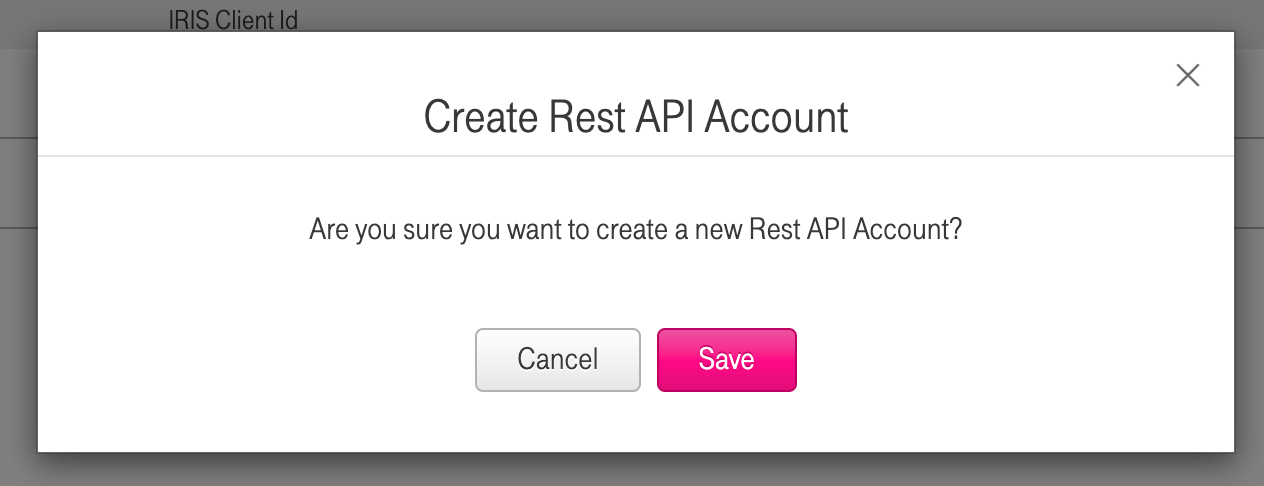
Figure 5: Confirm account registration
Click on "Save" again to complete the creation process.
Afterwards you will find a new entry in the overview (visible in figure 1), which informs you about the current status of the creation.
Delete application
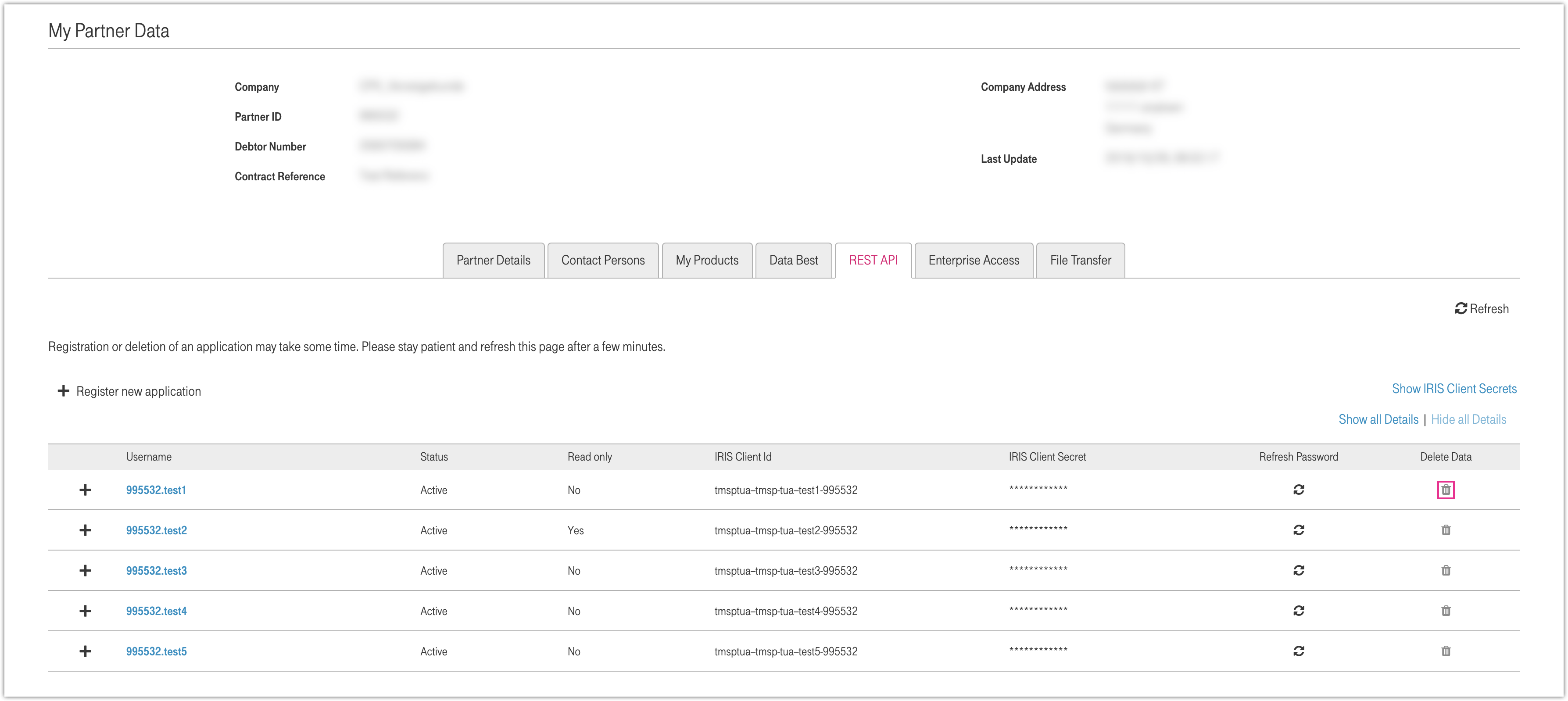
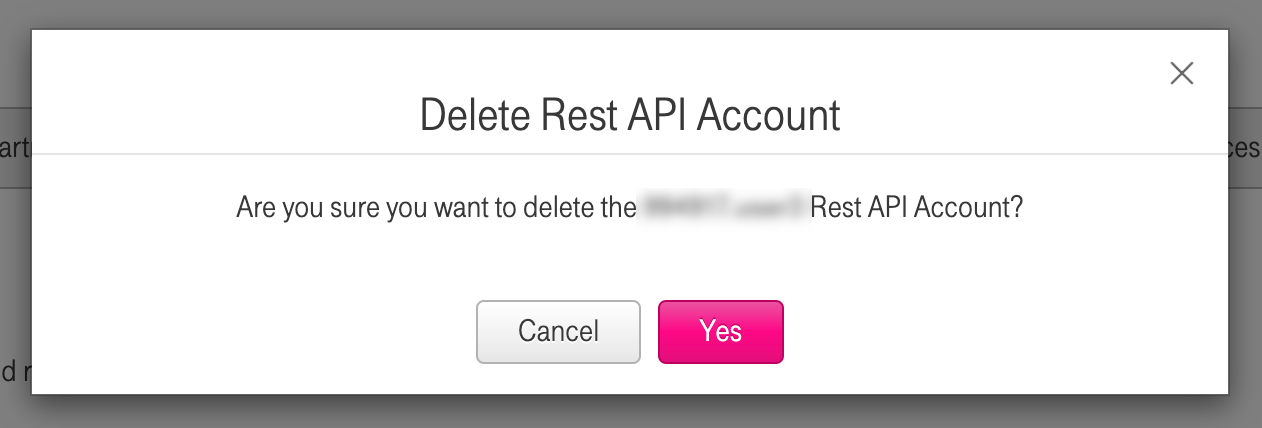
Figure 6: Delete application
If you want to delete an account, click on the trash can. A popup window will appear where you can confirm the deletion of the account.
Server Sent Events
As mentioned in section Getting Started there are different payloads possible regarding the event type.
SIM Action
A SIM Action event is provided when an action is started via a POST call in the Customer REST API and the corresponding workflow is finished.
{
  "time": "2025-08-02T09:54:13.133Z",
  "id": "00000000-0000-1000-a000-000706409461",
  "source": "/v1/partners/simaction",
  "specversion": "1.0",
  "type": "simaction.v1",
  "datacontenttype": "application/json",
  "data": {
    "partnerID": "100013",
    "signupID": "708855306",
    "message": "Action with signup ID 708855306 is done.",
    "actionLink": {
      "rel" : "actions",
      "href": "http://172.19.14.203:8083/v1/partners/100013/sims/actions/708855306",
      "type": "GET",
      "name": "get action status"
    }
  }
}
SIM Transfer Notifications (* optional service)
SIM Transfer Notifications are special SIM Action events which additionally contain the transaction ID and are sent not only when the corresponding workflow is finished, but also in various other places of the SIM Transfer workflow.
{
  "time": "2025-08-02T09:54:13.133Z",
  "id": "00000000-0000-1000-a000-000706409461",
  "source": "/v1/partners/simaction",
  "specversion": "1.0",
  "type": "simaction.v1",
  "datacontenttype": "application/json",
  "data": {
    "partnerID": "100013",
    "signupID": "708855337",
    "transactionID": "1002946614",
    "message": "You have received a request from 'Telekom Main Test Company' to add SIM cards to your inventory. Please follow the link to accept or reject them.",
    "actionLinks": {
      "accept": {
        "rel": "accept",
        "href": "https://mmint4.dev-vie.int.compax.at/m2m-customerapi-restservice/v1/partners/100015/sims/actions/simtransfer/1002947462",
        "type": "PATCH",
        "name": "update SIM transfer"
      },
      "reject": {
        "rel": "reject",
        "href": "https://mmint4.dev-vie.int.compax.at/m2m-customerapi-restservice/v1/partners/100015/sims/actions/simtransfer/1002947462",
        "type": "PATCH",
        "name": "update SIM transfer"
      },
      "sims": {
        "rel": "sims",
        "href": "https://mmint4.dev-vie.int.compax.at/m2m-customerapi-restservice/v1/partners/100015/sims/actions/simtransfer/1002947462",
        "type": "GET",
        "name": "get SIM transfer details"
      }
    }
  }
}
{
  "time": "2025-08-02T09:54:13.133Z",
  "id": "00000000-0000-1000-a000-000706409461",
  "source": "/v1/partners/simaction",
  "specversion": "1.0",
  "type": "simaction.v1",
  "datacontenttype": "application/json",
  "data": {
    "partnerID": "100017",
    "signupID": "708855337",
    "transactionID": "1002946615",
    "message": "'Telekom Secondary Test Company' has rejected your SIM Transfer request.",
  }
}
{
  "time": "2025-08-02T09:54:13.133Z",
  "id": "00000000-0000-1000-a000-000706409461",
  "source": "/v1/partners/simaction",
  "specversion": "1.0",
  "type": "simaction.v1",
  "datacontenttype": "application/json",
  "data": {
    "partnerID": "100013",
    "signupID": "708855337",
    "transactionID": "1002946615",
    "message": "'Telekom Main Test Company' has cancelled the request to transfer SIM cards.",
  }
}
{
  "time": "2025-08-02T09:54:13.133Z",
  "id": "00000000-0000-1000-a000-000706409461",
  "source": "/v1/partners/simaction",
  "specversion": "1.0",
  "type": "simaction.v1",
  "datacontenttype": "application/json",
  "data": {
    "partnerID": "100017",
    "signupID": "708855337",
    "transactionID": "1002946615",
    "message": "'The SIM Transfer between 'Telekom Main Test Company' and 'Telekom Secondary Test Company' has been completed.",
  }
}
Profile Notification
A Profile Notification is provided for a SIM card when a condition of an assigned limit profile or fraud profile is triggered. This can be a detected violation of a session or usage limit – or a device or location fraud.
{
  "time": "2025-08-02T09:54:13.133Z",
  "id": "00000000-0000-1000-a000-000706406251",
  "source": "/notification/limit",
  "specversion": "1.0",
  "type": "profilenotification.v1",
  "datacontenttype": "application/json",
  "data": {
    "partnerID": "100013",
    "sim": {
      "iccid": "8999829698800485278",
      "restrictionStatus:": "Speed Step-down"
    },
    "profileStatus": {
      "barring": "Session Limit",
      "barringType": "Limit",
      "barringLevel": 2,
      "allowed": "5",
      "detected": "6",
      "note": "Reached: Limit 2 Allowed (sessions): 5 Detected (sessions): 6"
    }
  }
}
{
  "time": "2025-08-02T09:54:13.133Z",
  "id": "00000000-0000-1000-a000-000706406251",
  "source": "/notification/limit",
  "specversion": "1.0",
  "type": "profilenotification.v1",
  "datacontenttype": "application/json",
  "data": {
    "partnerID": "100013",
    "sim": {
      "iccid": "8999829698800485278",
      "restrictionStatus:": "Speed Step-down"
    },
    "profileStatus": {
      "barring": "Session Limit",
      "barringType": "Limit",
      "barringLevel": 2,
      "allowed": "5",
      "detected": "6",
      "note": "Reached: Limit 2 Allowed (sessions): 5 Detected (sessions): 6",
      "apn": {
        "apnName": "b2b.dtag.test",
        "restrictionStatus": "Speed Step-down"
      }
    }
  }
}
Pool Limit Notification
A Pool Limit Notification is provided when a limit level of an assigned pool limit profile is triggered. There are possible pools for data, voice and SMS usage.
{
  "time": "2025-08-02T09:54:13.133Z",
  "id": "00000000-0000-1000-a000-000708986526",
  "source": "/notification/poollimit",
  "specversion": "1.0",
  "type": "poollimitnotification.v1",
  "datacontenttype": "application/json",
  "data": {
    "partnerID": "162652",
    "poolLimitNotification": {
      "poolName": "SMS Test Pool",
      "offeringName": "Test Pool PLS",
      "offeringID": 800206106,
      "typeOfThreshold": "SMS Limit 1",
      "limit": 50.0,
      "date": "2025-08-02T09:43:11.142Z"
    }
  }
}
Cost Limit Notification
A Cost Limit Notification is provided when a limit level of an assigned cost limit profile is triggered. There are possible cost limits for voice and SMS usage.
{
   "time": "2025-08-02T09:54:13.133Z",
   "id": "00000000-0000-1000-a000-000708986526",
   "source": "/notification/costlimit",
   "specversion": "1.0",
   "type": "costlimitnotification.v1",
   "datacontenttype": "application/json",
   "data": {
      "partnerID": "162652",
      "costLimitNotification": {
         "iccid": "8925475978255758883",
         "euiccid": "22233356789100043",
         "imsi": "254759782866388",
         "msisdn": "4367619128340",
         "offeringName": "Test SLS",
         "offeringID": 800000333,
         "typeOfThreshold": "SMS Limit 1",
         "limit": 25,
         "date": "2025-08-02T09:43:11.142Z",
         "profileName": "Test Cost Limit Profile",
         "profileID": 708529655
      }
   }
}
Version History
3.8.4
- Added SIM Change Tariff upgrade feature.
3.8.1
- Added the possibility to accept a SIM Transfer with the receiving partner being a subunit.
- Added new optional parameter subunitPartnerID to Update SIM Transfer.
- Added new element subunitPartnerID to the Get SIM Transfer Details response.
3.7.12
- The resources Get API Usage and Check SIM in HLR are deprecated for technical reasons.
3.7.11
- Added information about server sent events in Getting Started and a new tab with further information.
3.7.9
- SIM Unrestrict supports APN specific unrestriction.
3.7.8
- Introduced the resource SIM Book Option.
- Introduced the resource SIM Terminate Option.
3.7.7
- Introduced the resource SIM Change Option.
3.7.5
- Introduced new POST requests to make more SIM card identifiers like eUICCID (eID), IMSI, IMEI (IMEISV) or MSISDN available, depending on the request or type and status of the SIM card(s). See more details in the section Getting Started.
- New POST requests are: Get SIM Details, Get SIM Session, Get SIM Session History, Get SMS History, Check SIM in HLR, Reset SIM in HLR.
3.7.4
- Added specified peak request rate in section Protective Measures.
3.7.2
- Added new element euiccid to the Get SIM List response.
- Improved displaying of POST request examples by merging the schema example and individually documented request examples into a dropdown element of the Request Body section.
3.7.1
- Introduced the resource Bind eUICCID to bind or unbind eUICCIDs (eIDs) to SIM cards.
- Added element eidProfileStatus to the Get SIM Details response.
3.6.11
- Added element simAggregatedData to the Get SIM Details response.
3.6.10
- Added new optional parameter parallelSessions to Get SIM Sessions.
- When set to true it changes the response to show multiple sessions of the SIM card, if this service is booked.
3.6.5
- Changed all occurrences of actionId to signupId, to unitize parameters which are technically equivalent.
- Added new element signupId to the Get SIM Action List response.
3.6.4
- Added new flag overrideMoq for SIM Order to override the minimum order quantity of a SIM material.
- Added new element activationCode to the SIM Details response, which shows the activation code of a SIM card (if available) when the order process is completely finished.
3.6.3
- Added new elements network, sessionStart, volumeUpload, volumeDownload and volumeRounded to the Get SIM Session response.
3.6.2
- Added new additional element staticIpsPerApn to the request body of SIM Modify Profiles.
- Added new element bindingPeriod to the Get SIM Details response.
3.6.1
- Introduced the resource Get Current Pool Usage.
- Parameters dateFrom and dateTo in Get SMS History changed to optional.
- Result of Get SIM Action Status now contains a link to SIM Action Cancellation in case the action can be cancelled.
- Added restrictionReason to the responses of Get SIM Session and Get SIM Session History.
3.5.11
- Introduced the resource for Get SIM Action List.
3.5.9
- Introduced the resource for /partners/{partnerID} which retrieves the amount of SIM cards in specific states for the requested customer.
3.5.8
- Introduced the resources for Check SIM in HLR and Reset SIM in HLR.
- Added information about data consumption in SIM List.
3.5.6
- Introduced the resources for Enter Productive State, Restore Limit Status, Reset Limit Status and Reset Fraud Status.
3.5.4
- Go Live of productive Customer REST API.
3.5.3
- Added SIM Options to the SIM Details.
- Introduced the resources for SIM Restrict and SIM Unrestrict (optional services).
3.5.2
- Introduced the resource Send Message.
3.5.1
- Added the attributes SIM restriction, limit status and fraud status to the SIM Details.
- Introduced defaults for the timespan in the Session History.
3.4.11
- Introduced the resource Create SIM Order.